F · 01
Menu bar, nothing else.
Click the tray icon, pick a project and task, hit Start. No dock icon. No window in the way.
Time tracking made for
workers, not managers.
A local, open-source menu-bar time tracker for the data science & analytics community. Click, pick a project, start. Stop when you're done. Your data lives in a SQLite file — write your own reports, or use the reference Quarto docs.
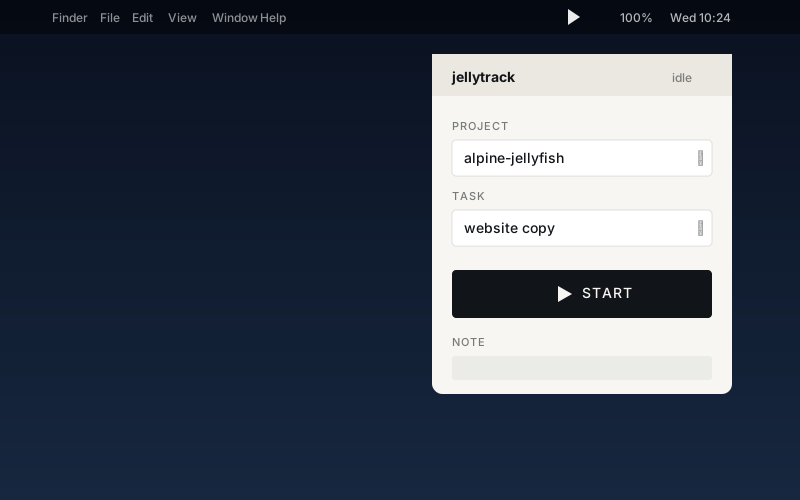
* assuming you know which project you're working on.
Record when it happens. Not as a compliance ritual.
Most time trackers try to be a tracker and a dashboard and a billing tool at once — which means guessing what you want to see, and burying the raw truth under charts. And Friday-afternoon timesheet reconstruction? That's not data, it's fiction.
jellytrack does one job: record what you worked on, and when.
The SQLite file sits right there in a schema you can read.
Write your own report — sqlite3, DuckDB, pandas,
a Jupyter notebook, a Quarto doc, your accountant's spreadsheet.
A time tracker for the AI age.
Your data is a plain .db file — bring your
favourite companion. Point Claude, Cursor, or ChatGPT at it
and ask “how much time did I spend on X this month?”
Adapt the report, adapt the app, adapt it to how you
work. Nothing walled off.
Built for people who'd rather GROUP BY than
click through yet another “insights” tab.
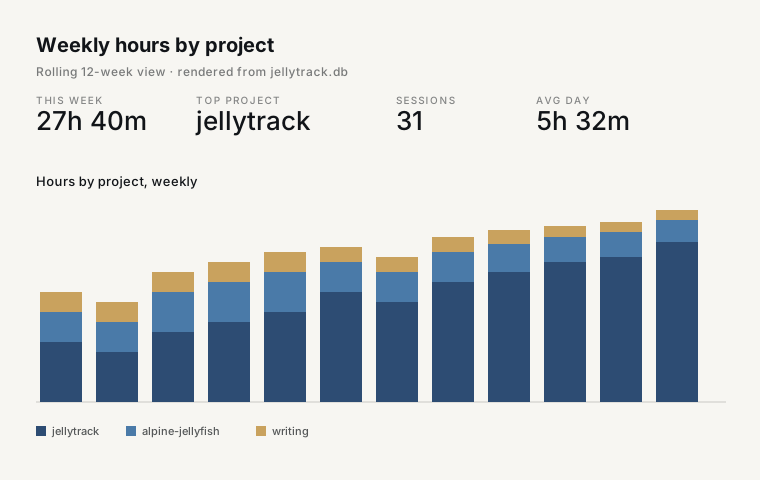 jellytrack-reports Quarto + R
 jellytrack is deliberately small. It records what you worked on and when — cleanly, locally, without asking you to build a workflow around it.
Click the tray icon, pick a project and task, hit Start. No dock icon. No window in the way.
Add projects and tasks from the same popover. Notes on every entry, autosaved. Manual entries for the times you forgot to start.
Restart within 60 seconds on the same project and jellytrack resumes the previous session. No more tiny fragment sessions to clean up later.
No login. No cloud. No teams. Point pandas, DuckDB, R, or your accountant's spreadsheet at the file.
jellytrack isn't signed with an Apple Developer ID
(why),
so macOS will call the download “damaged” the first time.
Drag jellytrack.app into /Applications, then
remove the quarantine flag once:
xattr -dr com.apple.quarantine /Applications/jellytrack.appRepeat once after each update. No telemetry, no login, no cloud.
Prefer to compile it yourself? Full source lives on codefloe. You'll need Bun ≥ 1.1, a Rust toolchain, and Xcode Command Line Tools.
git clone https://codefloe.com/alpine-jellyfish/jellytrack.git
cd jellytrack
bun install
bun run tauri build
Output lands in src-tauri/target/release/bundle/.
Full build instructions →
Requires macOS 12 or later · Apple Silicon & Intel builds · TWINT appreciated